Quacc++ is a proof of concept automated bug hunter that queries all public GitHub repositories to find vulnerabilities utilizing search patterns and static analysis. It leverages grep.app to search for matching keywords in repositories and supports code language filters, case sensitivity, and regular expressions (regex). Repositories that match the search condition are downloaded sequentially and static analysis is performed on the code with Semgrep.
How Quacc++ Works:
| Step | Action | Description |
|---|---|---|
| 1 | Automated Bug Hunting in open source code | The primary goal is to scan vast amounts of open source software for security flaws. |
| 2 | Uses grep.app to query 200M+ GitHub repositories | Utilizes the powerful search capabilities of grep.app to quickly identify potential candidate repositories based on user-defined keywords, language, or regex patterns. |
| 3 | Downloads GitHub source code | Once a repository is flagged as a potential match, Quacc++ downloads the repository source code to the local environment for in-depth analysis. |
| 4 | Executes Semgrep with a custom rule to determine the vulnerability | The downloaded source code is analyzed using Semgrep, a fast, open-source static analysis tool. Quacc++ employs a custom-designed rule specific to the vulnerability being sought, which allows for precise and efficient detection. |
The key strength of Quacc++ lies in its ability to combine the massive indexing power of grep.app with the precision of custom Semgrep rules, enabling security researchers to scan for specific vulnerability patterns at scale and identify exploitable issues.
Grep.App
Grep.app is a web-based code search engine that indexes public GitHub repositories and lets you search across them using regular expressions. It was built by a solo developer (Vadim Kantorov) and launched around 2020. The pitch is simple: search millions of repos instantly, with regex support, right in your browser: no cloning, no local setup.
The typical grep.app users are developers who want to learn by example. If a developer is unfamiliar with a particular function or library, they can query all of GitHub for use cases and implementations. It's also useful for security researchers looking for common vulnerability patterns, library authors checking adoption and usage patterns, and anyone doing due diligence on a codebase convention. It fills a niche between GitHub's native search (limited, slow with regex) and running your own grep across a local mirror.
Regex support is a genuine differentiator. You can search for complex patterns like useEffect\(.*\[\]\) to find React.js effects with empty dependency arrays, or import .* from ['"]lodash['"] to find specific Python import styles. Most general-purpose code search tools either don't support regex at all, or make it painful.
As an example, it is possible to search for instances where a password variable is initiated as some form of text. Regex is utilized In Figure 1.1 below. Grep.app gives hundreds of results to parse from. The red box below shows a self.rtpassword variable established as a base64 string. The green box located in the “supabase” repository, by contrast, correctly establishes password variables as dynamic variables.
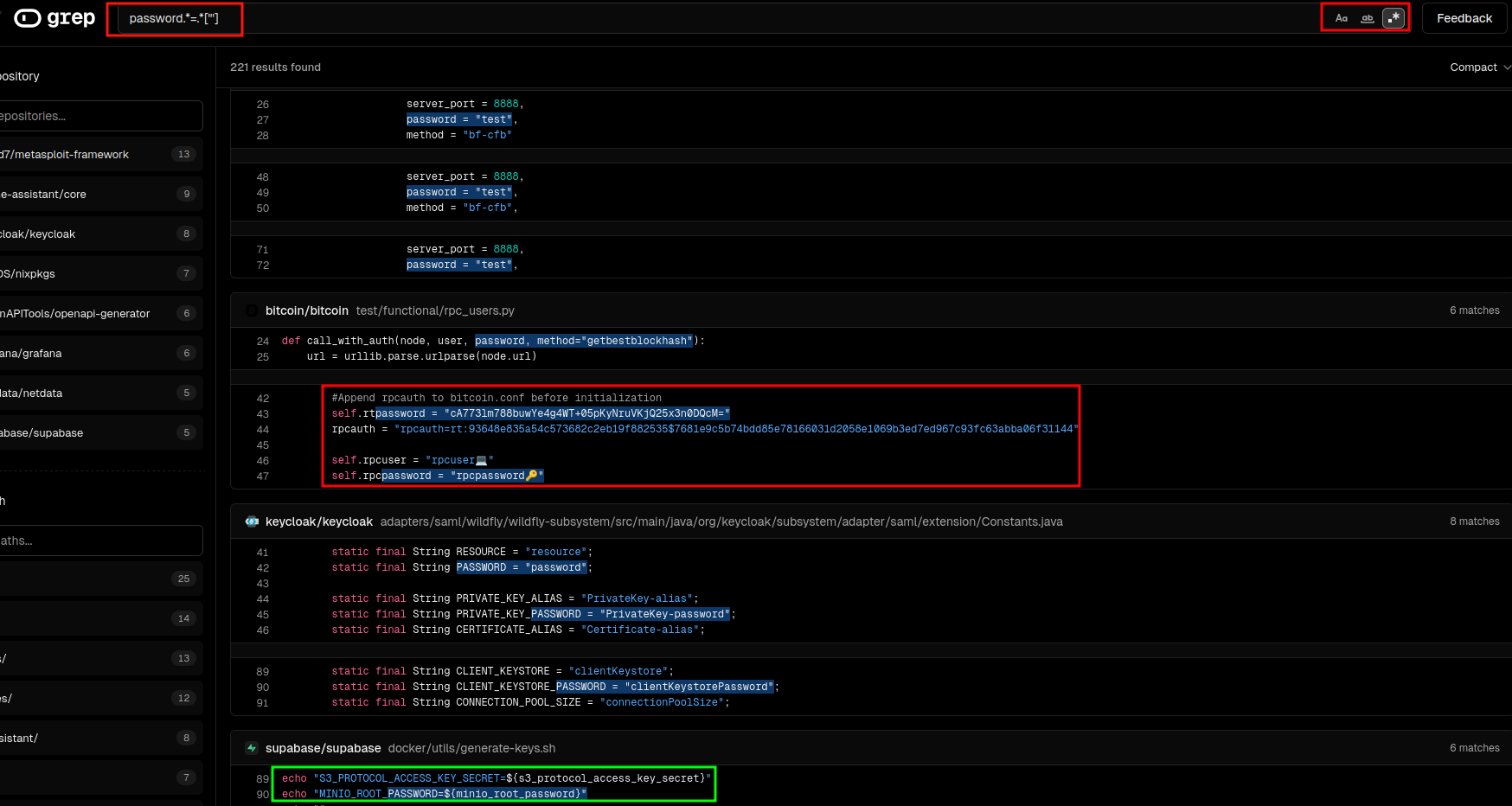
Figure 1.1: Using regex to search for password variables stored as strings w/ Grep.app
Limitations of Grep.app
Grep.app only indexes the default branch of public GitHub repositories and does not support private GitHub repositories, GitLab, or Bitbucket. Grep.app also doesn't support structural/semantic search (e.g. "find all callers of this function") the way Sourcegraph or CodeQL does. It's purely text/regex based. There's no account system, no saved searches, no API for programmatic use.
Semgrep
Semgrep (short for "semantic grep") is an open-source static analysis tool built by Semgrep Inc. (formerly r2c). For additional information on Semgrep, see our previous blog post: “Automated Bug Hunting With Semgrep.” Where grep.app searches raw text across repositories, Semgrep understands code structure — it matches patterns the way a compiler thinks about code, not the way a text editor does. It's used primarily for finding security vulnerabilities, enforcing coding standards, and catching bugs before they ship.
Semgrep rules are created with a .yml file type and have a regex-like syntax and can establish not one, but multiple patterns to match and filter out results. Below is an example of a rule that finds all printf() functions in a block of C code. The pattern matching filters out any functions that prints the y variable.
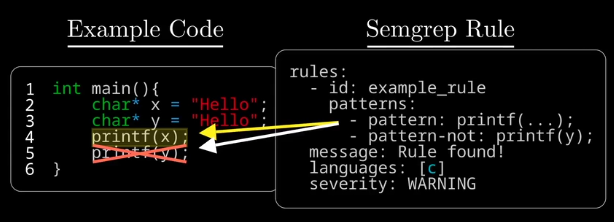
Figure 1.2: Semgrep Code has regex-like functionality for matching and filtering
Metavariables
Semgrep also utilizes a functionality called metavariables. This is a core functionality of Semgrep. The example code in Figure 1.2 above is a simple example of basic semgrep pattern search, but it is also possible to use multiple/nested pattern sequences to further scan a line of code. This specific Semgrep rule below checks for potential SQL injection vulnerabilities. The second half of the pattern matching is checking if that vulnerable code exists where a user supplies input to the variable. By leveraging techniques like pattern matching, metavariables and taint analysis (i.e. source to sink identification) false positives can be significantly reduced.
rules:
  - id: sql-injection-via-format-in-request-handler
    patterns:
      - pattern: |
          $QUERY = $FMT % $VAR
      - pattern-either:
          - pattern: |
              $QUERY = "SELECT ..." % $VAR
          - pattern: |
              $QUERY = "INSERT ..." % $VAR
          - pattern: |
              $QUERY = "UPDATE ..." % $VAR
          - pattern: |
              $QUERY = "DELETE ..." % $VAR
      - pattern-inside: |
          def $FUNC($REQ, ...):
            ...
      - pattern-not-inside: |
          def $FUNC($REQ, ...):
            ...
            $VAR = $SAFE_FUNC(...)
            ...
      - metavariable-regex:
          metavariable: $REQ
          regex: (?i)(request|req|ctx|context)
    message: >
      '$QUERY' is built by interpolating '$VAR' directly into a SQL string
      inside '$FUNC', which accepts a request object '$REQ'. This is a
      SQL injection risk. Use parameterised queries instead:
      cursor.execute("SELECT ...", (var,))
    languages: [python]
    severity: ERROR
    metadata:
      category: security
      cwe: CWE-89
      confidence: HIGH
Take a look at another example below, the rule is named “hardcoded-api-key”. It looks for specific code patterns where a variable is established as a string that is 8 characters or more ( .{8,}). It is also checking for the variable to be named “api_key”, “api_token”, etc. The metavariable $VAR is leveraged to show the dynamic content of the api key’s contents.
rules:
  - id: hardcoded-api-key
    patterns:
      - pattern: $VAR = "$STRING"
      - metavariable-regex:
          metavariable: $VAR
          regex: (?i)(api_key|apikey|api_token|secret_key|access_token)
      - metavariable-regex:
          metavariable: $STRING
          regex: .
    message: >
      Hardcoded credential found in '$VAR'. Move this to an environment
      variable or secrets manager.
    languages: [python, javascript, typescript, go, java, ruby]
    severity: ERROR
    metadata:
        category: security
        cwe: CWE-798
Other Useful Semgrep Features
Cross-file analysis (Pro only)
Cross-function taint analysis (interprocedural) (Pro only)
Enterprise Languages (e.g. Salesforce Apex) (Pro only)
Metadata Comparison
Quacc++
Quacc++ bridges the gap between Grep.app and Semgrep. This program allows for the mass scanning of Github public repositories for potentially vulnerable repositories. Once a repository is identified, it is downloaded locally and Semgrep takes over to scan the repository files. Quacc++ runs both commands while piping input directly into Semgrep, keeping the pipeline straightforward and requiring minimal manual intervention from the researcher.
Quac++ Live Demo: Finding a Buffer Overflow Vulnerability in a public github repository
The video above demonstrates the use of Quacc++ to search for Buffer Overflow vulnerabilities via the search query strcpy(buf, argv[. This query searches for the strcpy() function in the text. Quacc++ then pulls those repositories locally and runs a custom Semgrep taint rule that traces data flow from external sources like argv, getenv, and recv into fixed-size stack buffers, confirming only the cases where no bounds check exists between the source and the dangerous copy.
This strategy discovered a stack buffer overflow in Google DeepMind's Lab repository; the 3D environment used to train reinforcement learning agents. The vulnerable function, GetArgumentFiles() in engine/code/bspc/bspc.c, performs an unbounded strcpy of a user-supplied command line argument into a fixed 1024-byte stack buffer with zero length validation.
Utilizing AddressSanitizer it was possible to confirm a stack buffer overflow with a write of 2049 bytes at line 242. GDB with a pwntools cyclic pattern identified RIP control at offset 1080 bytes. The final confirmation — rip = 0x4242424242424242 — left no room for doubt. A single command line argument longer than 1023 bytes gives an attacker full control of the instruction pointer.
In another example, Quacc++ was utilized to look for instances of code where certificate checks were being bypassed or ignored. We can utilize the grep.app query wget *—no-check-certificate and the following Semgrep rule:
rules:
  - id: no-cert-validation-shell
    message: "Possible MITM vulnerability: certificate validation is disabled or ignored."
    severity: WARNING
    languages: [bash]
    patterns:
      - pattern-either:
          - pattern-regex: '\bcurl\b[^\n]*(\s-k\s|\s--insecure\b)'
          - pattern-regex: '\bwget\b[^\n]*\s--no-check-certificate\b'
      - pattern-not-regex: '(?i)\b(localhost|127\.0\.0\.1|::1)\b'
    metadata:
      category: security
      technology: ssl/tls
      cwe: "CWE-295: Improper Certificate Validation"
      confidence: MEDIUM
  - id: no-cert-validation-python-requests
    message: "Possible MITM vulnerability: certificate validation is disabled or ignored."
    severity: WARNING
    languages: [python]
    patterns:
      - pattern-either:
          - pattern: requests.$METHOD(..., verify=False, ...)
          - pattern: requests.request(..., verify=False, ...)
          - pattern: $SESSION.verify = False
    metadata:
      category: security
      technology: ssl/tls
      cwe: "CWE-295: Improper Certificate Validation"
      confidence: MEDIUM
  - id: no-cert-validation-javascript
    message: "Possible MITM vulnerability: certificate validation is disabled or ignored."
    severity: WARNING
    languages: [javascript, typescript]
    patterns:
      - pattern-either:
          - pattern: |
              new https.Agent({ rejectUnauthorized: false })
          - pattern: |
              process.env.NODE_TLS_REJECT_UNAUTHORIZED = "0"
          - pattern: |
              process.env.NODE_TLS_REJECT_UNAUTHORIZED = '0'
    metadata:
      category: security
      technology: ssl/tls
      cwe: "CWE-295: Improper Certificate Validation"
      confidence: MEDIUM
  - id: no-cert-validation-go
    message: "Possible MITM vulnerability: certificate validation is disabled or ignored."
    severity: WARNING
    languages: [go]
    pattern: |
      &tls.Config{InsecureSkipVerify: true}
    metadata:
      category: security
      technology: ssl/tls
      cwe: "CWE-295: Improper Certificate Validation"
      confidence: MEDIUM
This is a rule that will check for instances of curl or wget command use with either the -k or —no-check-certificate flag enabled. Using curl with -k / --insecure or wget with --no-check-certificate disables SSL/TLS certificate verification, allowing any certificate, including fraudulent ones, to be trusted. This eliminates TLS's core protection against man-in-the-middle attacks, meaning an attacker who can intercept traffic can silently read or modify data in transit. These flags are often added as a quick fix for certificate issues in development; however, they frequently make their way into production code. The rule also filters out HTTPS requests to localhost. Check out the BSides San Diego 2025 presentation on Quacc++ highlighting this technique.
In short, Quacc++ brings together the breadth of Grep.app's search with the precision of Semgrep's analysis. This methodology demonstrates the ability to scan large amounts of source code quickly and find valid vulnerabilities with a lower probability of false positives.